
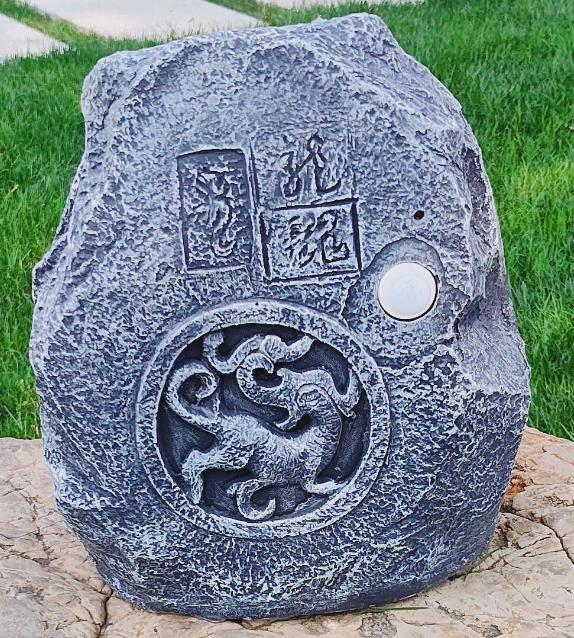
TS一003Solar-Powered Sensor Speaker
Product Specifications
Product Size: Length x Width x Height 280/230/310mm
1. Solar panel power: 2.2–3.7W.
2. 18650 lithium battery: 2400mAh.
3. LED lamp power: 0.5–1W.
4. Speaker: 5.25-inch full-range waterproof speaker.
5. Power: 4Ω/10W
6. Bluetooth 5.1 version, Bluetooth board power 5W
7. Human infrared sensing distance: 8–13 meters.
8. Three playback modes:
– Sensor trigger mode (red light on)
– Loop play mode (blue light on)
– Bluetooth mode (red and blue lights on)
9. Audio sources: Bluetooth or TF card playback.
10. Timer function (keys 1–9 correspond to timer 1–9 hours), key 0 cancels.
11. In daytime sensing mode, music stops automatically 1 minute after people leave and resumes when someone is present.
12. Lights turn on automatically at night; after leaving, the light returns to 10% brightness after 30 seconds, and is full brightness when someone is present.
13. Power supply voltage: 3.7–5V.
14. Remote control distance: 8–15 meters.
15. Low battery voice alert.
16. Waterproof rating: IP65.
17. Uses Bluetooth TWS technology, can connect two Bluetooth speakers to play music simultaneously.
18. WS connection distance: 15–20 meters
19. With full battery and 50% volume, it can work continuously for over 24 hours.
Instructions for Use
Solar-Powered Human Sensing Bluetooth Light-Up Speaker
1. Device Connection: The speaker is turned off when it leaves the factory. Before using, switch the power to ON inside the control box on the back of the speaker. At this point, the signal light will blink blue, and the speaker will automatically read the songs or recordings from the TF card. The TF card is pre-installed in the slot at the factory. The speaker has three modes: loop mode, trigger sensor mode, and Bluetooth mode. If the TF card is removed, only Bluetooth mode is available.
2. Loop Mode: Use the MODE button on the remote to select loop mode. The indicator light will be red. By default, it plays the TF card. To turn it off, press the power button on the remote, or if there’s no remote, manually turn it off using the control box on the back of the speaker.
3. Trigger Mode: Press the MODE button on the remote to select trigger mode; the indicator light will be red. In sensor mode, the operation depends on whether it’s day or night:
– During the day, when the sensor detects a person, it will automatically play one minute of audio from the TF card. If the sensor detects motion again during that minute, playback will continue, resetting the one-minute countdown. Playback stops when the countdown ends.
– At night, when the solar panel senses dim light, the light automatically turns on. When the sensor detects a person, the light brightness will jump from 10% to 100% for one minute. Similarly, if motion is detected again within that minute, the countdown resets for another minute. After the minute ends, the light returns to 10% brightness. In night trigger mode, only the light is activated; music will not play.
4. Bluetooth Mode: Press the MODE button on the remote to select Bluetooth mode. The indicator light will flash red and blue with a voice prompt. In Bluetooth mode, two independent Bluetooth speakers can pair and connect automatically within 15 seconds. Before the speakers are paired with each other, neither speaker can connect to a phone; otherwise, they cannot connect to each other.
5. Remote Control Buttons
1. The round button is the repeat button. When playing music from a USB drive or TF card, a single press will loop the music or switch playback.
2. The red MUTE button is the power/mute button. Press and hold to turn the device on or off. Press briefly to mute or unmute the sound.
3. The MODE button switches modes between Bluetooth, repeat, sensor, and radio modes.
4. The 0-9 number keys are for timed playback. Keys 1-9 correspond to playback hours; 1 plays for 1 hour, 2 for 2 hours, and so on. 0 cancels the timed playback.
5. The USB/SD button switches between USB and TF card playback.
6. The FM button is for FM radio.
7. The Previous/CH- button selects the previous track or radio station.
8. The Next/CH+ button selects the next track or radio station.
9. Play/Pause button plays or pauses music. In radio mode, it changes stations.
10. The EQ button cycles through different sound effects for music playback.
11. The VOL+ button increases the volume.
12. The VOL- button decreases the volume.
6. Bluetooth name: MidiPu
